Learn
Drills and typing practice
- Master Key (drills available on Github)
- Type Fu (drills available on Github)
- amphetype - customize your own drills with some of the most detailed analysis on your progress
- Klavaro
Klavaro
Create a file called “norman_us.kbd” and place it in a directory like “C:\Program Files (x86)\Klavaro-1.9.4/share/klavaro/norman_us.kbd”.
Copy and paste the following into the file, then save it. Be sure to keep the space preceding the z and Z.
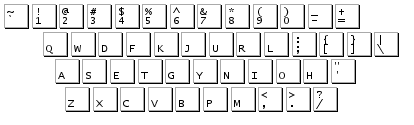
`1234567890-=
qwdfkjuhl;[]\
asetgynior’
zxcvbpm,./
~!@#$%^&*()_+
QWDFKJUHL:{}|
ASETGYNIOR”
ZXCVBPM<>?
Web-based typing practice
- PowerTyping.com
- typeracer - increase your typing speed while racing against others
- Online Typing Test WPM
Interesting hardware
The Truly Ergonomic Keyboard appears to be the best, reasonable hardware layout for a keyboard that I've seen. I like the design better than the stuff made by frogs, from typematrix, or kenesis. I haven't tried it, and my work environment isn't really setup for an external keyboard with a USB cable, but if I tried an alternate keyboard right now, that would be it. It has the option to have blank key caps, too.
The problem I have with the TEK is that it makes the finger stretches for the middle finger the same as for other fingers. The original design of Norman places the D and H keys above the middle fingers because they can most easily stretch to the top row in a traditional offset keyboard. To fit the TEK, I would likely make significant changes to the layout, but can't say what they might be without actually spending some time with the keyboard in-person.
Get started with Norman. It’s completely free! Source files and alternate platforms like Linux are available
Add new comment